Exhibit E · CoriRx CD RegisterHealthcare SaaS · Legal recordDesigned · corrections proposed7 min read
A legal record that can be corrected, but never rubbed out.
[1]7gaps found by comparing my flows, step by step, with 4 competitors
[2]0ways for the balance to quietly go below zero
[3]24 hdefault life of an inspector link, so nobody has to remember to end it
4decision stories
* These describe the design. The correction pattern in story 1 was proposed to engineering, and the write-up has no shipped results yet.
Every UK pharmacy keeps a controlled drugs register: every box of oxycodone or morphine in and out, and a running balance that must match the shelf. A mistake here is a legal problem, not just a UX one. These are four decisions that shaped the CD Register in CoriRx, including one where I had to admit my first design was wrong.
Role
Designed the CD Register end to end, and helped build the frontend.
Company
Encon Pharma, for CoriRx.
Users
Pharmacists, dispensers, inspectors.
The rule
Every entry is permanent, and signed by a named person with their PIN.
At a glance
The 60-second version.
Problem
A CD register is a legal record. You can't rub out a mistake, and the running balance must match the shelf.
Hardest call
Admitting my own correction flow was wrong, after comparing it step by step with four competitors.
Decisions
Fix mistakes from the entry itself, scan before search, block a mismatched balance instead of warning, and give inspectors a read-only link.
01 · The register
One register per drug, balance first.
Every UK pharmacy records every controlled drug in and out, with a witness and a running balance that must match the shelf. The balance sits on its own at the top of each register, because it's the first number an inspector checks.
One register per drug. Recreated from the Figma designs; sample data.
02 · Decision stories
Four decisions that shaped it.
01
I found my own correction flow was wrong.
Finding
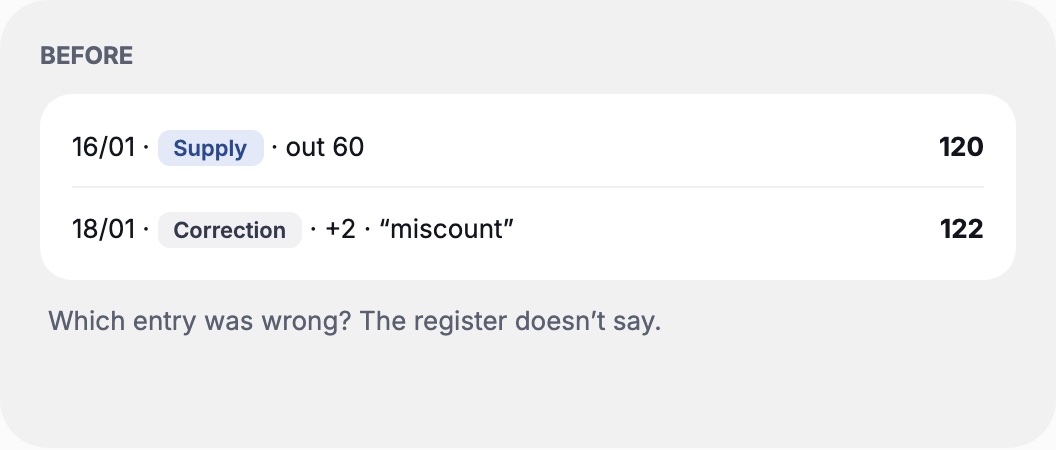
My first correction was simple: choose “Correction”, add or remove a quantity, give a reason. The balance came out right, but the wrong entry stayed in the register, unmarked. An inspector would see two numbers that don't agree, with nothing joining them. I only saw this when I compared our flows, step by step, with CDRx, PharmCD, CDsmart and Pharmace.
Decision
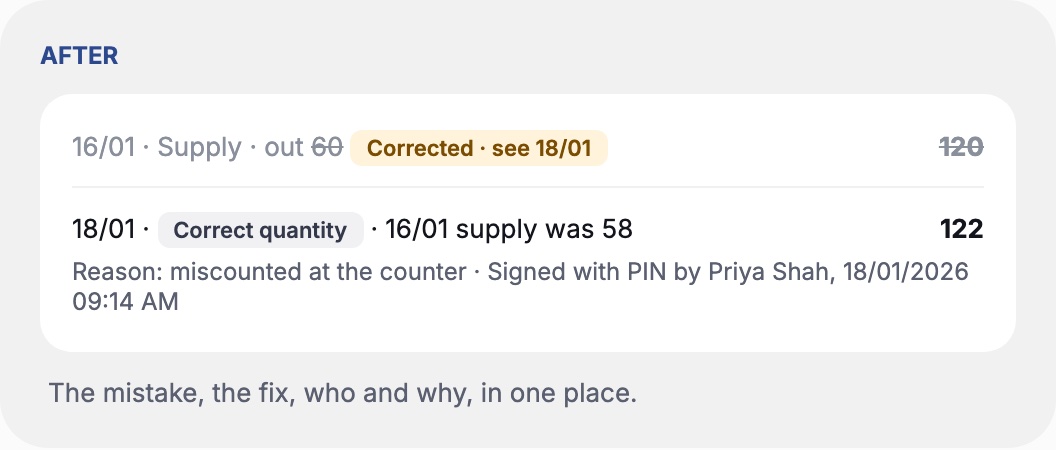
Fix a mistake from the entry itself. Each row gets three choices: Annotate (a typo, the numbers are fine), Void (wrong register, so reverse it) or Correct quantity. Every choice needs a reason and a PIN. The original stays visible but struck through, linked to its fix, with who changed it and when.
BeforeBefore: which entry was wrong? The register doesn't say.AfterAfter: the mistake, the fix, who and why, in one place. Proposed pattern; sample data.
02
Scan first, so nobody picks the wrong strength.
Finding
Finding a drug meant typing its name and choosing from near-identical forms, strengths and pack sizes, at a busy counter, often with a patient waiting.
Decision
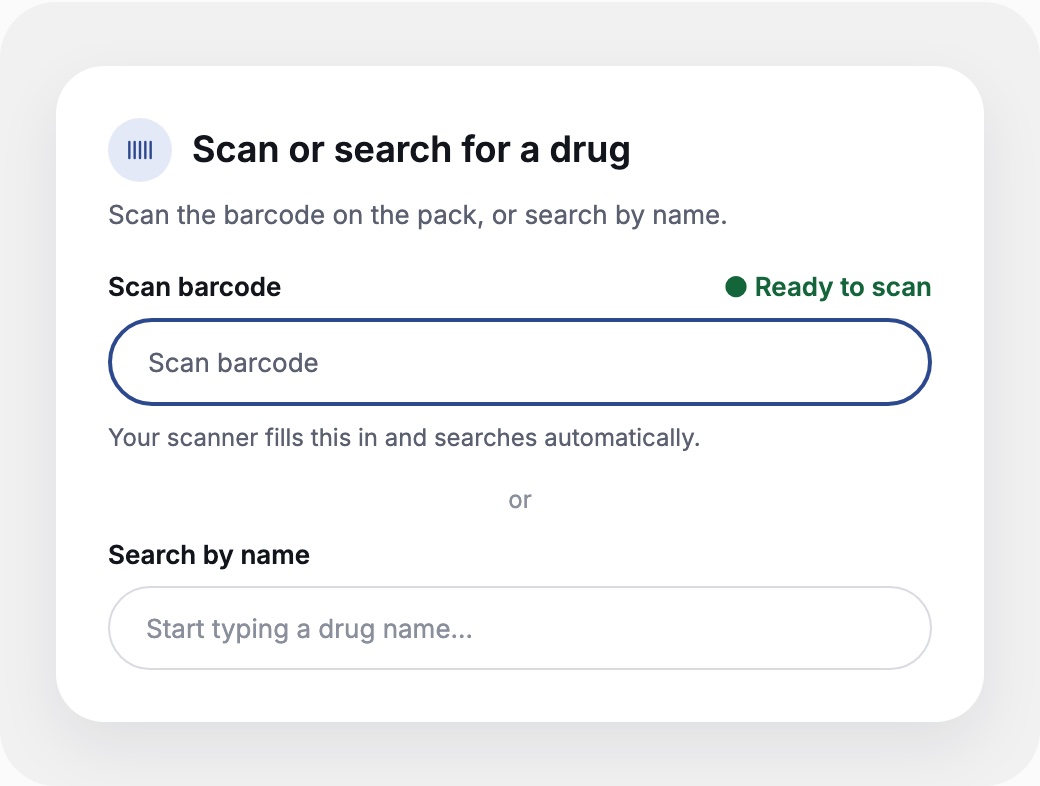
Scanning is the first step. One “Scan or search” window opens with the barcode field ready. Most pharmacy scanners type like a keyboard, so a scan fills the field and searches straight away, with no setup. A “Ready to scan” label tells staff it will work before they try.
AfterScan or search. Recreated from the Figma designs.
03
“The register says 120. You're removing 122.”
Finding
The easy design was a yellow warning with a Continue button. Under pressure, people press Continue, and the balance goes below zero.
Decision
Block the entry with a plain message that states both numbers, and give one way forward: Reconcile. That opens a balance check where the register balance is shown but locked, and the physical count is required. Later I added a bulk balance check for big registers.
AfterOut of sync, and the balance check. Recreated from the Figma designs.
04
Give the inspector a link, not your computer.
Finding
The obvious way is for the inspector to sit at the pharmacy's computer. Staff stop working, and the inspector can see whatever else is open.
Decision
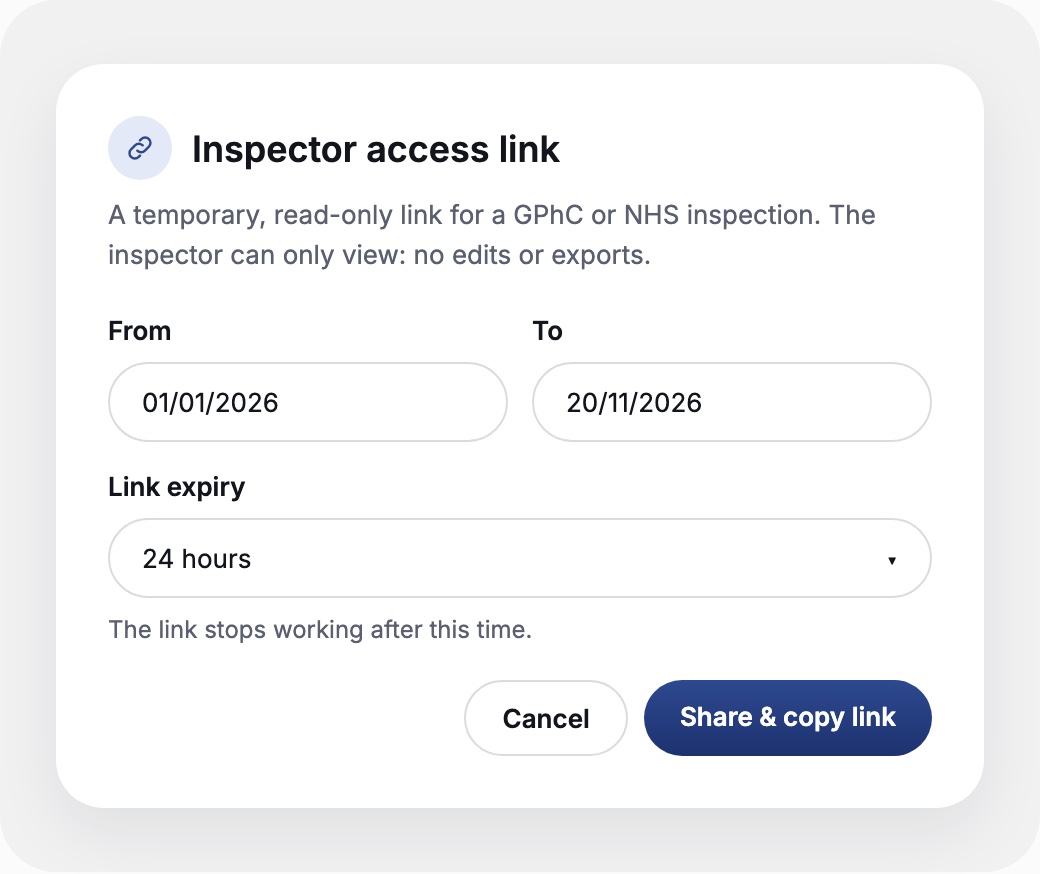
An inspector access link: pick the dates and an expiry, then share it. It's read-only, and the window says “no edits or exports” in plain words. An inspector preview shows the pharmacist exactly what the inspector will see.
AfterInspector access link. Recreated from the Figma designs.
03 · What the comparison found
Six more gaps, each with a suggested flow.
The same comparison found six more gaps. I wrote it up with a suggested flow for each, so engineering could turn it into tickets.
The gaps
Patient returns were logged as destructions, which wrongly lowers stock.
Expired stock had no “awaiting destruction” list.
There was no way to record a witness from outside the pharmacy.
Supplies didn't record who collected, or whether ID was checked.
Receipts had no invoice number.
Registers didn't show the CD schedule.
04 · Smaller decisions
The details that add up.
The balance gets its own card.Top of every register, with the date of the last check.
Pills always carry a word.Receipt, Supply, Destruction: colour helps, but the word does the work.
Witness on every row.Who witnessed and who entered sit side by side, because both names matter legally.
Register balance is locked in a check.You can see it, but only the physical count can be typed in.
24 hours by default.Inspector links expire on their own.
Opening balance locks (proposed).After the first entry, the starting balance can't be edited, so history can't be rewritten.
05 · Reflection
What I took from this.
Finding my own mistake was the most useful thing I did.Comparing my design with competitors was uncomfortable, but it found seven real gaps before customers did.
In a legal record, some friction is the feature.Blocking an entry felt harsh at first, but a warning you can close protects nobody.
Say the rule on the screen.“No edits or exports” and “Ready to scan” cost a few words and remove a lot of doubt.