HomeGet in touch

Exhibit D · CoriRx Compliance SuiteHealthcare SaaS · ComplianceReleased in stages8 min read

Making a pharmacy ready for inspection every day, not just the week before.

  1. [1]13tools on one shared pattern
  2. [2]1score and one to-do list for every branch
  3. [3]13states designed for the scoring-weights screen

13 toolsone score

* These describe what was designed. The suite is rolling out in stages, so result numbers come later.

UK community pharmacies must keep a dozen legal records, from who the Responsible Pharmacist is today to the running balance of every controlled drug. They lived in separate books, sheets and tools, so a branch often found a gap only when an inspector asked for it. I designed CoriRx Compliance Suite at Encon Pharma: 13 tools that share one login, one way to sign and one score.

Role
Product Designer and Frontend Developer.
Company
Encon Pharma, for CoriRx.
Timeline
2026.
Users
Pharmacists, branch managers, head office, inspectors.
Surfaces
13 tools, Overview, Scorecard, Inspection Readiness.
Devices
Desktop, shared branch terminals, phones.
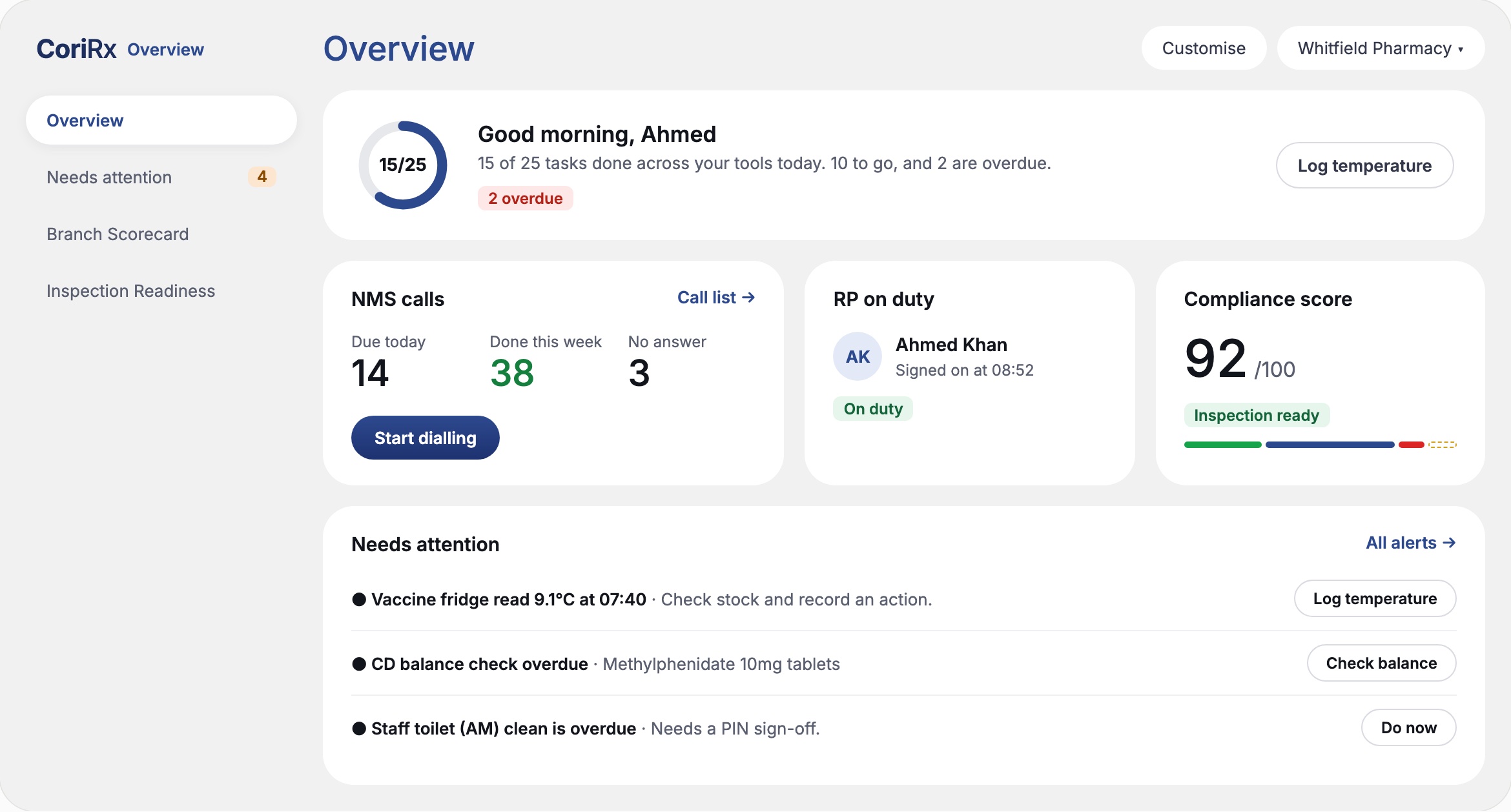
CoriRx Overview for a pharmacy: 15 of 25 tasks done today, NMS calls, the Responsible Pharmacist on duty, a compliance score of 92 out of 100 and four items that need attention

At a glance

The 60-second version.

Problem
Thirteen kinds of record, each in its own place. Nobody could see the whole picture, so gaps stayed hidden until an inspection.
Reframe
Not “put the paper online”, but “make every record help answer one question: are we ready?”
What I designed
13 tools on one shared pattern, a PIN sign-off that works as a legal signature, the Overview, the Compliance Scorecard, Inspection Readiness with a one-click pack, and a group view for head office.
Key decision
A tool that stops sending records is a gap, not a pass. It shows as “not scored” and stays on the readiness list until the records exist.
Where it stands
Released in stages through 2026 and demoed at The Pharmacy Show in October.

01 · The problem

A record nobody can see is a risk nobody can fix.

A pharmacy can be inspected by the GPhC at any time, and the inspector expects complete records: the Responsible Pharmacist log, the controlled drug register and its running balance, fridge temperatures, cleaning, training, SOPs and near misses. Each one has its own rules and its own owner. Before CoriRx, each one also had its own place.

13
separate tools, each a legal or professional record
4
roles that each need a different view
1
shared computer in many branches, used by every member of staff
  1. Scattered.To answer “are we up to date?”, someone had to open every book and every tool, one by one.
  2. Shared screens.Many staff use one branch computer. A normal login can't tell you who actually signed a record.
  3. No early warning.A missing week of records was often found during the inspection, when it was too late to explain.

02 · Approach

One base, one pattern, one answer.

Thirteen separate tools could easily mean thirteen ways to log in, sign and search. So I treated the suite as one system with three layers, each with its own users.

A shared base · everyone

One branch login plus a 6-digit PIN for each person. Records can be corrected but never deleted. Items set by head office arrive locked at branches.

One tool pattern · branch staff

Every tool has the same shape: a dashboard, the register, an audit trail and settings. Learn one, and you know all 13.

One answer · managers and head office

The Overview, Scorecard and Inspection Readiness read from every tool and turn it all into one score and one to-do list.

The 13 tools

  • NMS, Fridge Temperature, Room Temperature, RP Log, CD Register
  • Cleaning & Hygiene, Methadone, Staff Training, Equipment Maintenance
  • Service Bookings, Near Miss, SOP Management, Patient Management

03 · Decisions

What the branch sees, and why.

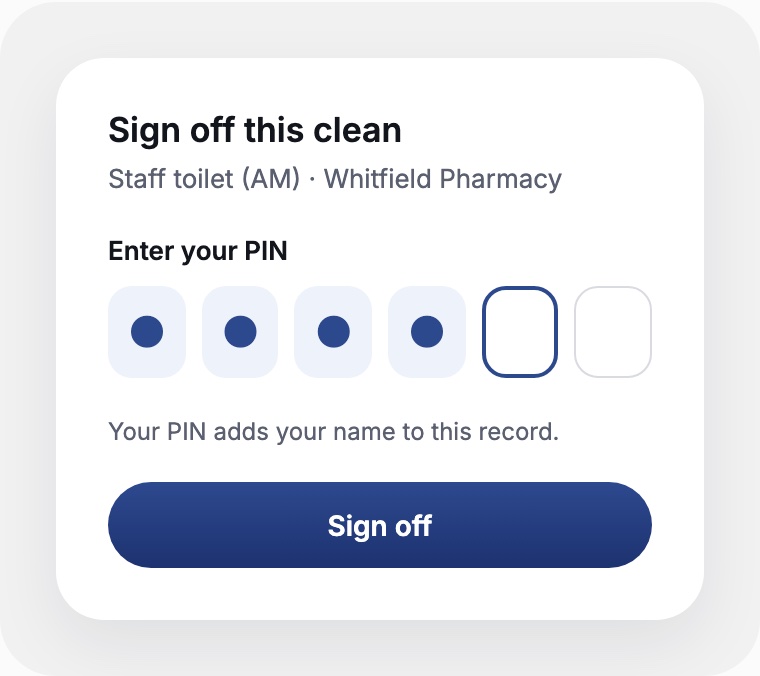
  1. The PIN is a signature, not a password.

    Finding
    Many staff use one branch computer, so a normal login can't say who signed a record.
    Decision
    The branch logs in once. Each person signs an entry with their own 6-digit PIN, as a quick sign-off on the action itself, not a second login screen. Staff never leave the task, and every entry has a named person behind it.
    AfterPIN sign-off panel: sign off the staff toilet morning clean by entering a 6-digit PIN
    PIN sign-off. Recreated from the Figma designs; sample data.
  2. One screen for the whole branch.

    Finding
    To know where a branch stood, someone had to open every tool.
    Decision
    The Overview pulls today's tasks, who is on duty and the branch score from every tool onto one screen, with what needs attention and a one-click action on each item.
    AfterCoriRx Overview for a pharmacy: 15 of 25 tasks done today, NMS calls, the Responsible Pharmacist on duty, a compliance score of 92 out of 100 and four items that need attention
    Overview. Recreated from the Figma designs; sample data.
  3. A score that says what it can't see.

    Finding
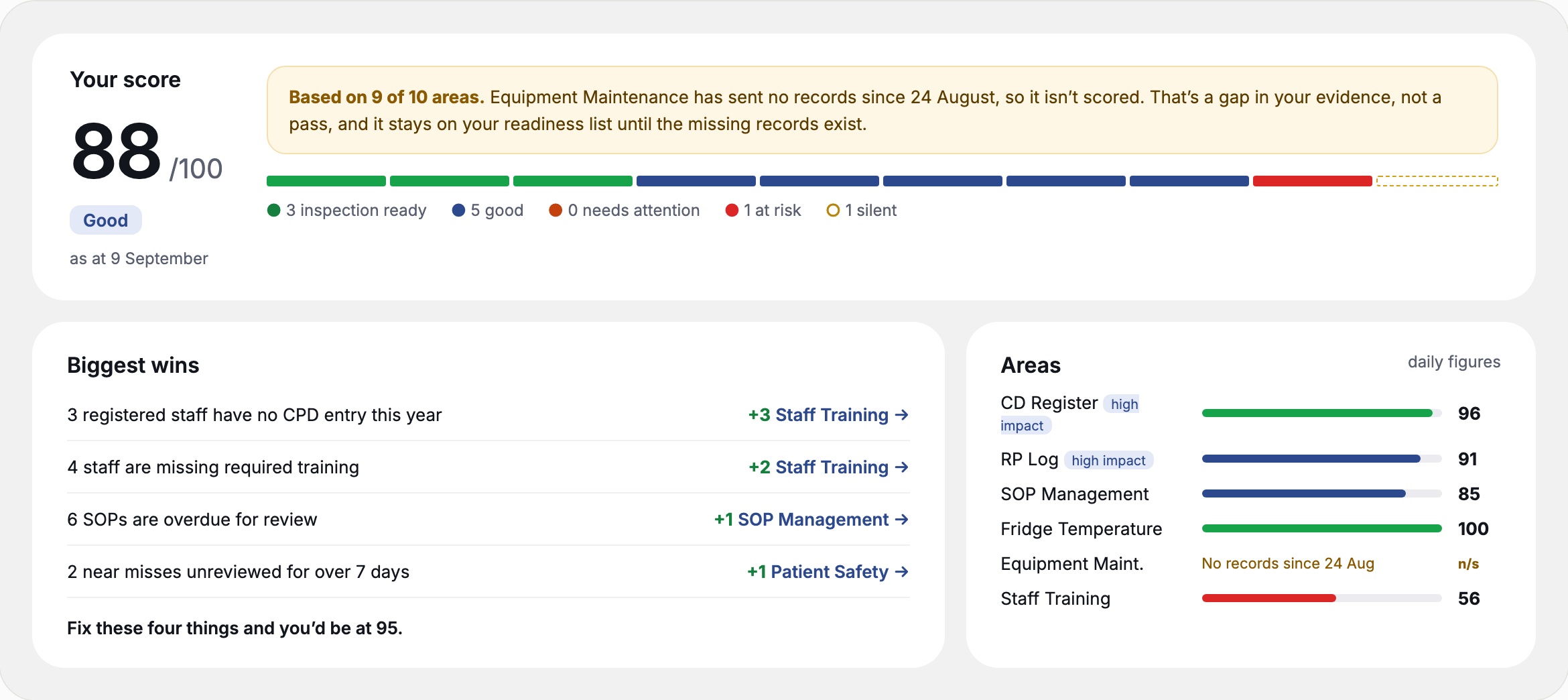
    An average score treats a late clean like a wrong drug balance, and a tool with no records looks fine.
    Decision
    Areas are weighted by legal risk, with “high impact” tags on the CD Register and RP Log. A silent area shows as “not scored”. “Biggest wins” ranks fixes by points and links straight into the tool. The trend uses daily figures only, so Refresh never rewrites the past.
    AfterBranch Scorecard: a score of 88 out of 100 based on 9 of 10 areas, because Equipment Maintenance has sent no records; a list of biggest wins and a bar for each area
    Branch Scorecard. Recreated from the Figma designs; sample data.
  4. Not an all-clear while records are missing.

    Finding
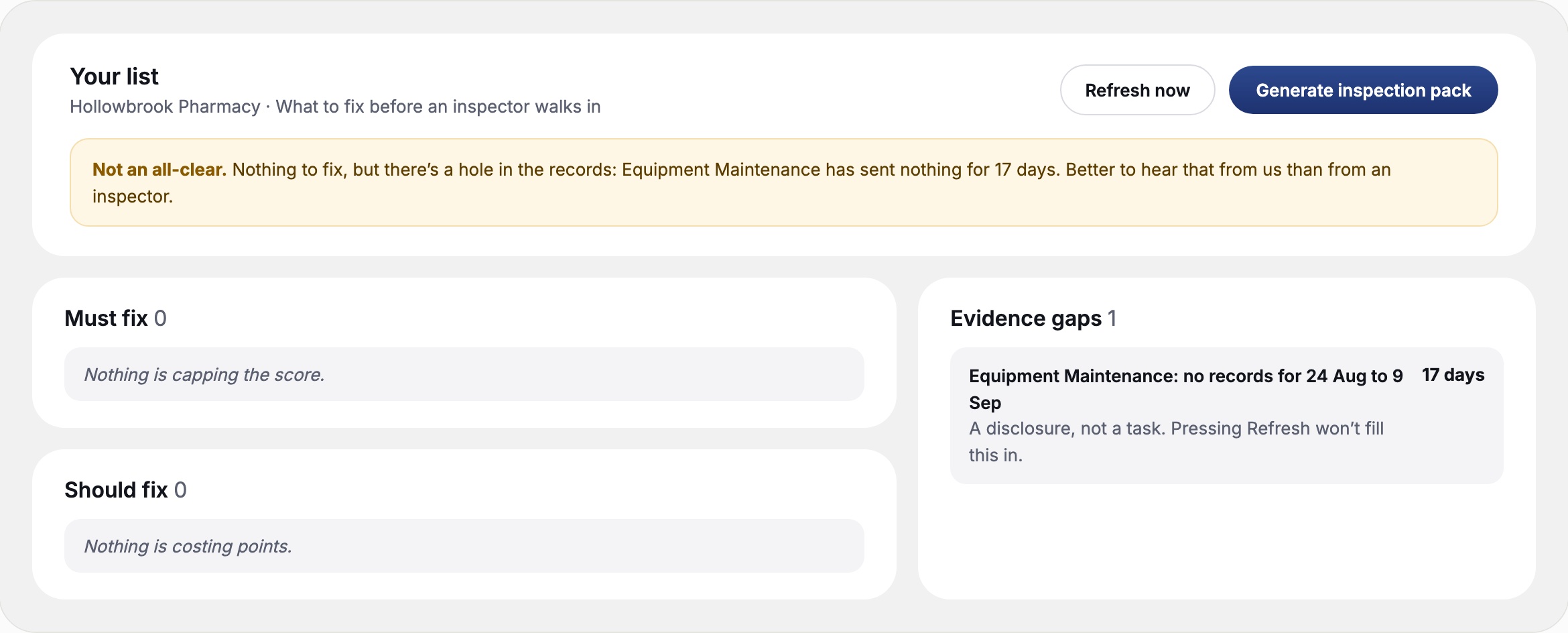
    A branch with nothing to fix can still have a hole in its records.
    Decision
    Inspection Readiness splits Must fix, Should fix and Evidence gaps. A gap is a disclosure, not a fake task, because no button can fill 17 missing days. One button builds the inspection pack from every tool, with a history of past packs.
    AfterInspection Readiness: a banner says this is not an all-clear because Equipment Maintenance has sent nothing for 17 days; Must fix 0, Should fix 0, Evidence gaps 1
    Inspection Readiness. Recreated from the Figma designs; sample data.

04 · The trade-off

Four ways to answer “are we ready?”

I judged every option by one question: how much work is left between opening the app and knowing exactly what to fix?

How the four options compare
OptionWhat the branch getsWork left to know what to fix
A · Status per tool13 separate answersOpen every tool and add it up in your head
B · Average scoreOne number that may hide riskWork out which areas matter, and spot silent tools yourself
C · Weighted scoreOne number that reflects legal riskDecide which fix moves the score most
D · Weighted + gaps + wins (chosen)The score, what it can't see, and a ranked fix listClick the top item

05 · Group level

Designing for head office, too.

Head office can set how much each area counts, see every branch in one report and switch off areas a branch doesn't use. A change here moves the score of every branch, so I designed the scoring-weights screen with 13 states.

The important ones protect the score: an area with open breaches can't be switched off, a save that creates a new breach is flagged, and if someone else saved first, you're told before overwriting them.

The 13 states

  • Default, Editing, Pending change, Area switched off, All areas off, Field error
  • Switch locked by open breaches, New breach on save, Someone else saved first
  • Save failed, Loading, Load error, Not an org admin

06 · Process

How I worked across 13 tools.

  1. Structure first.For each tool, I agreed the reasoning, the structure and the edge cases with engineering before drawing screens.
  2. Working HTML builds.I built clickable HTML versions so the team could compare layouts and review flows before anything went into Figma.
  3. Clear handoff.Every module got a written design brief and a build brief, so what shipped matched what was designed.
  4. Design and code.As a designer who also builds the frontend, I could check my designs in the real product and close gaps fast.

07 · Measuring success

How I'd know it's working.

The suite is rolling out in stages, so these are the measures I'd track next, not results I can claim yet.

  1. Time to build an inspection pack.From gathering paper around the branch to one export.
  2. Branches with no “Must fix” items.Tracked week by week across the group.
  3. Days before a silent tool is noticed.Should fall from “at inspection” to “the same week”.
  4. Overview tasks done by closing.The “15 of 25” ring, averaged across branches.
  5. Branches using 5+ tools a week.Shows whether the suite replaces paper, not just one book.
  6. Corrections vs new entries.In the CD Register, corrections should stay rare.

Your design work has really elevated this product.

Zeeshan Ali, Encon Pharma (team feedback, not user research)

08 · Reflection

A score is only honest if it says what it can't see.

  1. The “not scored” state was the hardest part.It took more design work than any chart, and it's the part I'm proudest of.
  2. Shared screens change what a signature means.Treating the PIN as a legal signature, not a login, shaped every sign-off in the suite.
  3. Thirteen tools need one design language.When small fixes skipped design, icons, wording and colours drifted. That's why I started a formal design system from our Figma file.
  4. Next, test the score with real branches.Do people trust a number that can go down? I'd watch how branch managers react the first time it drops.

Next exhibit

Healthcare SaaS · Legal recordA legal record that can be corrected, but never rubbed out.