Who · What is a “customer”?
Someone who tapped a card once? An invoice client? A CRM lead? A supplier? Each product meant something different.
Exhibit C · Paayed Customer RecordDecision making · FinTech · B2BApproved, in build8 min read
1 of 12features, on purpose
* From the designs and the engineering spec they were built against. The record is in build, so usage results come later.

At a glance
01 · The brief
The ticket read: “Turning 3 standalone products into 1 connected platform – 2 weeks.” Attached were two long documents from engineering about databases and accounting entries. My first task: prepare a spec on what changes are required.
Before I opened Figma, I wrote down every question the brief left open.
Someone who tapped a card once? An invoice client? A CRM lead? A supplier? Each product meant something different.
Payments, Accounting and CRM each had their own idea of a client list. Which one wins, or is it a fourth place?
Two records, same email, different names. Who decides they're the same business?
Twelve capabilities were listed. Clearly not all twelve.
02 · Making sense of it
Instead of asking each product team what they needed, I traced every way a customer gets into Paayed. That one map explained most of the mess.
A merchant should open one page and know what a customer has paid, what they owe and what to do next, whichever product they came through, without ever being shown a wrong merge.
The problem statement every later decision was tested against
Seven doors in, one record out
03 · Decision stories
04 · Micro decisions
| Decision | Why |
|---|---|
| Card ending (•••• 4242) when there's no name | Card-only payers are still customers; the last four digits are how a merchant recognises them. |
| A product tag on every activity row | Shows where each event came from, so the connected view stays honest. |
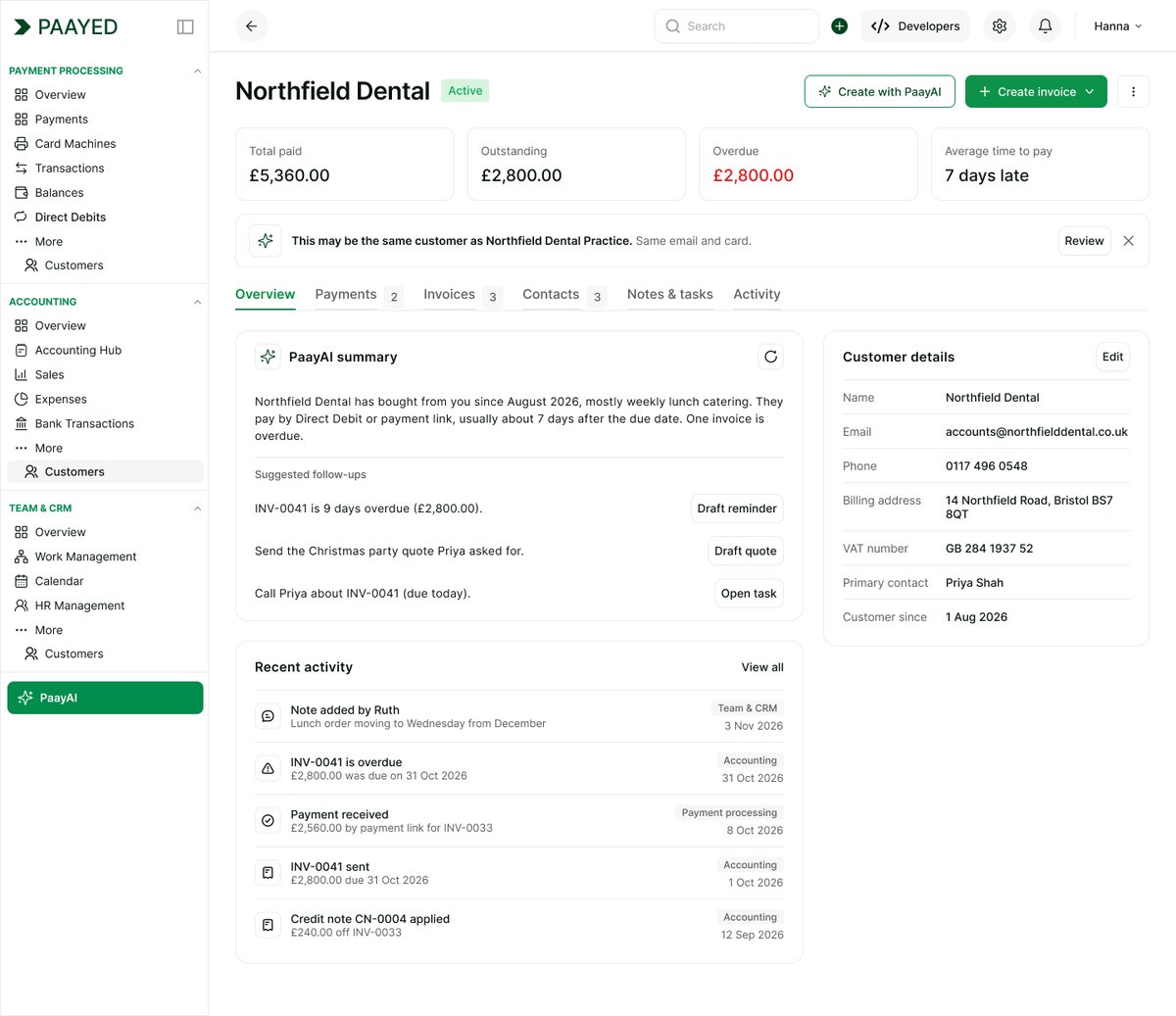
| Counts on tabs (Payments 2, Invoices 3) | Six tabs is a lot. Counts show which ones are worth opening. |
| Filter chips by product in Activity | Finance people can see only Accounting events without leaving the story. |
| “First seen” and “Last seen” on each card | The evidence a merchant needs to judge a possible duplicate. |
| Add with PaayAI: paste or upload an invoice | Fills the form and checks for an existing customer before a duplicate is made. |
| A dismiss (×) on every duplicate banner | The merchant can say “these are different” and not be asked again. |
05 · Edge cases
| Situation | What happens |
|---|---|
| Someone taps a card with no name | A customer is created and shown by card ending. If they're invoiced later, the card links to the named customer. |
| Same email, new card | Joined to the existing customer: a certain match. |
| Similar name, different email | Two customers, plus a “may be the same” suggestion. Never joined on its own. |
| Invoice paid with someone else's card | Payment goes to the invoice's customer, and a duplicate suggestion is raised. |
| A CRM lead becomes a client | The lead converts into a customer, and its notes and activity come with it. |
| A merge was a mistake | Undo. Every payment, invoice and note goes back, and the merge is logged. |
06 · Measuring
07 · Reflection
Next exhibit
Healthcare SaaS · ComplianceMaking a pharmacy ready for inspection every day, not just the week before.